
Download MyJad Android Data Recovery – Android data recovery, lost file recovery, recover deleted files, restore photos and videos, recover SD card data
Overview
MyJad Android Data Recovery is a specialized utility designed to help users retrieve lost or deleted data from Android devices. Whether the data was accidentally removed, the SD card was formatted, or a factory reset was performed, this app provides a targeted solution for restoring essential files. Its primary purpose is to recover images, videos, documents, and other commonly used file types, making it a valuable tool for individuals who rely heavily on their mobile devices for personal or professional use. The app caters to users seeking a reliable method to recover data without requiring advanced technical knowledge.
Target users include everyday smartphone owners, photographers, students, and professionals who store important information on their Android devices. The software addresses a common pain point: the irreversible loss of digital content. By offering a structured recovery process, MyJad helps prevent data loss from becoming a permanent setback. While the developer, MyJad, has been associated with this tool since its release in 2013, no additional details about the company’s background or broader product offerings were provided.
Real-world use cases include recovering vacation photos after a mistaken deletion, retrieving work documents after a device reset, or restoring media files from a corrupted SD card. In the broader app ecosystem, MyJad fills a niche for data recovery utilities, particularly for users who need a straightforward, no-frills solution. Its long-standing presence since 2013 suggests a level of stability and user trust, though specific performance metrics or user statistics were not disclosed.
Key Features & Functionality
- Fast and Complete Recovery: The software is engineered to scan and restore lost files efficiently, minimizing downtime. Users can initiate a recovery process and expect timely results, which is especially beneficial when retrieving urgent or irreplaceable data.
- Safe Read-Only Scanning: MyJad uses a read-only scanning method, ensuring that the recovery process does not alter or overwrite existing data on the device. This protective approach helps maintain data integrity and reduces the risk of further loss.
- High-Quality File Preview: Before recovery, users can preview photos and videos in their original resolution and format. This feature allows for informed decisions, ensuring that only desired files are restored and reducing the chance of recovering corrupted or unwanted content.
- User-Friendly Interface: The app’s interface is designed for accessibility, enabling users of all experience levels to navigate through the recovery workflow with ease. Clear menus and intuitive controls simplify the process of selecting and restoring specific files.
- Versatile File Recovery Options: The tool supports a wide range of file types, including images, videos, documents, and other common formats. This versatility makes it suitable for various recovery needs across different user profiles.
For example, a user who accidentally deleted a folder of family photos can use the preview function to verify the quality before recovery. Similarly, someone who formatted their SD card can scan and selectively restore only the necessary files, avoiding unnecessary clutter. These practical applications highlight the app’s real-world value in preserving digital memories and important data.
Interface, UX & Performance
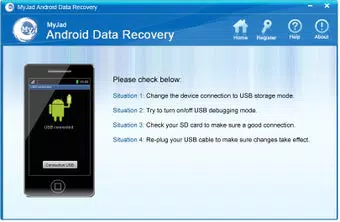
MyJad Android Data Recovery features a clean and minimalistic interface that prioritizes usability. The layout is organized around core recovery functions, with clearly labeled buttons and a logical flow from connection to preview to recovery. Navigation is straightforward, allowing users to move through each stage without confusion. The design emphasizes clarity, making it accessible even to those unfamiliar with data recovery tools.
Visual elements are functional rather than ornamental, focusing on readability and task efficiency. Icons are simple and contextually relevant, reducing cognitive load during use. The app’s responsiveness appears consistent across device categories, though specific performance benchmarks were not provided. Although the developer did not list formal performance metrics, the app’s design suggests optimized operation for standard Android devices.
Stability is implied by the app’s long-standing availability since 2013, indicating that it has undergone multiple updates to maintain compatibility. However, no information was given about crash rates, memory usage, or background performance. Users can expect a smooth experience during scanning and previewing, but real-world behavior may vary based on device hardware and Android version. Overall, the UX is designed to minimize user anxiety during a stressful recovery process.
Platform Compatibility & Technical Requirements
MyJad Android Data Recovery is available exclusively on the Android platform. The current version is 1.0.0, with a file size of 15.2 MB, making it a lightweight application suitable for devices with limited storage. The developer did not specify minimum OS requirements, nor did they list compatibility with specific Android versions or device models.
Given the app’s release date of 2013, it is possible that the software was originally designed for older Android systems. However, no confirmation was provided about whether it has been updated to support modern Android versions. Users are advised to check compatibility with their device before installation. The absence of detailed technical specifications means that users should proceed with caution, especially if using a newer device or OS version.
Pros and Cons
- Designed for fast and reliable data recovery
- Uses safe read-only scanning to prevent data overwrites
- Allows high-quality file previews before recovery
- Intuitive interface suitable for non-technical users
- Supports multiple file types including photos, videos, and documents
- Version 1.0.0 may not be optimized for newer Android systems
- No publicly available information on compatibility with modern devices
- Price of $14.99 may be considered high for a single-purpose utility
- Developer did not provide performance metrics or update history
- File size is small, but no details on storage or RAM usage during operation
FAQ
Is MyJad Android Data Recovery safe to use?
Yes, the app uses a read-only scanning method, which means it accesses lost data without modifying or overwriting files on the device. This ensures that the recovery process is non-invasive and safe for your data.
Can I recover files after a factory reset?
Yes, MyJad Android Data Recovery is designed to retrieve data lost after a factory reset, provided the data has not been overwritten by new information. The success rate depends on how quickly the recovery is initiated after the reset.
Does the app work with SD cards?
Yes, the software supports recovery of data from SD cards, including files lost due to formatting or accidental deletion.
Is MyJad compatible with all Android devices?
The developer did not specify compatibility details. While the app has been available since 2013, its support for newer Android versions and devices is not confirmed. Users should verify compatibility with their specific device before installation.
How often is the app updated?
No information was provided about the update frequency or maintenance schedule. The current version is 1.0.0, released in 2013, suggesting minimal recent updates.
Final Thoughts
MyJad Android Data Recovery stands as a dedicated tool for users facing the distress of lost data on their Android devices. Its core strengths—safe scanning, file previews, and a user-friendly interface—make it a practical choice for those needing to recover photos, videos, and documents. While the app’s age and lack of updated technical details raise questions about modern compatibility, its fundamental functionality remains relevant.
It is best suited for users with older Android devices or those who require a no-frills recovery solution. The $14.99 price point may be a barrier for some, especially given the limited availability of recent updates. However, for individuals who value data integrity and ease of use, MyJad offers a reliable path to recovery.
Download MyJad Android Data Recovery now and safeguard your digital memories and important files.


